
From a Figma frame to a working app
The demo always works. Someone pastes a Figma URL, a screen appears in the browser, and the room makes an approving noise. Then you open it on a phone, or click a button, and the gap becomes obvious: you have a picture of an app rendered in HTML, not an app.
That gap is not a failure of the import. It is the difference between what a design file contains and what an application needs, and no importer can close it — because the missing information was never in the file.
What a design file actually holds
A Figma frame is a precise description of one state. This screen, with this data, at this width, when nothing has gone wrong. That is genuinely a lot: colour, type scale, spacing, hierarchy, component boundaries, the assets themselves.
All of that transfers, and transferring it by hand is the part designers and developers both hate — reading hex values out of an inspector panel and typing them into a stylesheet.
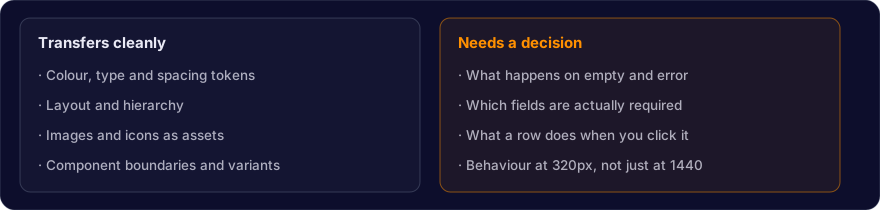
The right column is the whole job. A design shows a table with eight rows. It does not say what happens at zero rows, at two thousand, while loading, or when the request fails. It shows a form. It does not say which fields are required, what the validation message is, or whether the submit button should be disabled while the request is in flight.
Those are not oversights by the designer. They are decisions nobody has made yet, and the import is simply the moment they become unavoidable.
What good import looks like
The useful measure is not "did it produce a screen" but "did it produce something I can change". Four stages, each of which can be done badly:

Tokens before pixels. An import that writes #5B47FF into forty components has copied the design. An import that defines a colour token and references it forty times has understood it. The difference appears the first time the brand colour changes.
Components, not divs. If the design has a card used twelve times, the output should have one card component used twelve times. A flat wall of positioned divs looks identical in a screenshot and is unmaintainable a week later.
Layout that survives resizing. Auto-layout maps reasonably onto flexbox and grid. Absolutely positioned output does not survive a phone, and most traffic is a phone.
Wiring is separate. The last stage is where an app stops being a picture. Treat it as its own step and the first three become reviewable on their own.
How CodeSky handles it
The design canvas imports Figma frames with their assets rather than approximating them as boxes, and the design-to-code agent generates components against your project's existing conventions instead of a generic scaffold.
The part worth knowing: an imported screen lands in the same project as everything else, so the wiring step uses the schema and API that already exist rather than inventing its own. That is the difference between an imported screen and a bolted-on one.
It still will not decide what your empty state says. Nothing will.
The honest workflow
Import the frames. Check the tokens before anything else — if those are wrong, everything downstream inherits it. Then go looking for the states the design never showed, because that list is your actual remaining work, and it is usually longer than the screen count suggests.
Designs describe the good case. Applications live in the other ones.